
Do you know?
Providing IT and IT-enabled services costs Active Taxpayers just 4% in withholding tax, while Non-Filers must pay 8%. • If you receive dividends from Independent Power Purchasers (IPPs), Filers pay a 7.5% tax while Non-Filers surrender 15%. • The withholding tax on banking and financial institution profits is set at 20% for those on the Active Taxpayers’ List, but jumps to 40% for those off the list. • Profits on debt from mutual funds deriving 50% or more income from debt carry a huge 50% tax for Non-Filers, compared to 25% for Filers. • Dividends from Real Estate Investment Trusts (REITs) and general companies cost Active Filers 15% in tax, but Non-Filers lose a massive 30%. • Commercial importers bringing in Part-III items are hit with a 12% tax rate if they are Non-Filers, compared to only 6% for Active Filers. • Importing pharmaceutical products carries an 8% tax for Non-Filers, which is exactly double the 4% rate applied to Active Taxpayers. • Capital gains arising on the disposal of certain debt securities are taxed at 15% for Filers, but double to 30% for Non-Filers. • Salaries under Rs. 600,000 are completely tax-free, maintaining a 0% rate regardless of your taxpayer status. • Pensions under 10 million rupees remain 100% tax-exempt for everyone, no matter what your filing status is. • The sale of petroleum products is taxed at 12% for Filers and exactly double that at 24% for Non-Filers. • Importing basic goods from Part-I of the Twelfth Schedule costs Active Taxpayers just 1% in tax, while Non-Filers have to pay 2%. • Winning a prize bond or crossword puzzle means you lose 15% to taxes as an Active Filer, but a massive 30% if you are a Non-Filer. • Purchasing a 1601cc to 1800cc vehicle will cost Non-Filers a 9% tax, which is three times the 3% rate given to Active Filers. • Buying a high-end 2501cc to 3000cc vehicle leaves Filers with a 9% tax bill, but absolutely punishes Non-Filers with a massive 27% tax rate. • Active Filers importing CKD kits for Electric Vehicles pay a minimal 1% tax, whereas Non-Filers pay double at 2%. • Registering a 1000cc motor vehicle costs Filers just 1% in tax, while Non-Filers are penalized with a 3% tax. • Winning a raffle, lottery, or sales promotion prize costs Non-Filers a whopping 40% in tax, compared to 20% for Filers. • Cash withdrawals by a person whose name does not appear on the Active Taxpayers’ List are hit with an automatic 0.8% advance tax. • Buyers of 1301cc to 1600cc cars pay a 2% advance tax if they are Filers, but Non-Filers pay exactly triple at 6%. • Commercial importers of Part-II goods face a 3.5% withholding tax if they are Filers, but the rate doubles to 7% for Non-Filers. • Payments made to non-resident sportspersons incur a 15% tax if they are on the ATL, and a massive 30% if they are non-ATL. • Registering a 2001cc to 2500cc luxury vehicle incurs a 7% tax for Active Filers, but a staggering 21% tax for Non-Filers. • Selling rice, cotton seed, or edible oils comes with a low 1.5% tax for Filers, but a 3% tax for Non-Filers. • Companies generating rental income from immovable property pay a 15% tax if they are Active Filers, but face a 30% rate as Non-Filers. • Payments to electronic and print media for advertising services are taxed at just 1.5% for Active Taxpayers, compared to 3% for Non-Filers. •
Providing IT and IT-enabled services costs Active Taxpayers just 4% in withholding tax, while Non-Filers must pay 8%. • If you receive dividends from Independent Power Purchasers (IPPs), Filers pay a 7.5% tax while Non-Filers surrender 15%. • The withholding tax on banking and financial institution profits is set at 20% for those on the Active Taxpayers’ List, but jumps to 40% for those off the list. • Profits on debt from mutual funds deriving 50% or more income from debt carry a huge 50% tax for Non-Filers, compared to 25% for Filers. • Dividends from Real Estate Investment Trusts (REITs) and general companies cost Active Filers 15% in tax, but Non-Filers lose a massive 30%. • Commercial importers bringing in Part-III items are hit with a 12% tax rate if they are Non-Filers, compared to only 6% for Active Filers. • Importing pharmaceutical products carries an 8% tax for Non-Filers, which is exactly double the 4% rate applied to Active Taxpayers. • Capital gains arising on the disposal of certain debt securities are taxed at 15% for Filers, but double to 30% for Non-Filers. • Salaries under Rs. 600,000 are completely tax-free, maintaining a 0% rate regardless of your taxpayer status. • Pensions under 10 million rupees remain 100% tax-exempt for everyone, no matter what your filing status is. • The sale of petroleum products is taxed at 12% for Filers and exactly double that at 24% for Non-Filers. • Importing basic goods from Part-I of the Twelfth Schedule costs Active Taxpayers just 1% in tax, while Non-Filers have to pay 2%. • Winning a prize bond or crossword puzzle means you lose 15% to taxes as an Active Filer, but a massive 30% if you are a Non-Filer. • Purchasing a 1601cc to 1800cc vehicle will cost Non-Filers a 9% tax, which is three times the 3% rate given to Active Filers. • Buying a high-end 2501cc to 3000cc vehicle leaves Filers with a 9% tax bill, but absolutely punishes Non-Filers with a massive 27% tax rate. • Active Filers importing CKD kits for Electric Vehicles pay a minimal 1% tax, whereas Non-Filers pay double at 2%. • Registering a 1000cc motor vehicle costs Filers just 1% in tax, while Non-Filers are penalized with a 3% tax. • Winning a raffle, lottery, or sales promotion prize costs Non-Filers a whopping 40% in tax, compared to 20% for Filers. • Cash withdrawals by a person whose name does not appear on the Active Taxpayers’ List are hit with an automatic 0.8% advance tax. • Buyers of 1301cc to 1600cc cars pay a 2% advance tax if they are Filers, but Non-Filers pay exactly triple at 6%. • Commercial importers of Part-II goods face a 3.5% withholding tax if they are Filers, but the rate doubles to 7% for Non-Filers. • Payments made to non-resident sportspersons incur a 15% tax if they are on the ATL, and a massive 30% if they are non-ATL. • Registering a 2001cc to 2500cc luxury vehicle incurs a 7% tax for Active Filers, but a staggering 21% tax for Non-Filers. • Selling rice, cotton seed, or edible oils comes with a low 1.5% tax for Filers, but a 3% tax for Non-Filers. • Companies generating rental income from immovable property pay a 15% tax if they are Active Filers, but face a 30% rate as Non-Filers. • Payments to electronic and print media for advertising services are taxed at just 1.5% for Active Taxpayers, compared to 3% for Non-Filers. •











PRA # P12025071601021341604. Its CPR is required.
I filed my tax return of 2024 in November 2024 , but my ATL status is in-active , why is suddenly in-active.
If you have filed 2024 tax return after due date, October 31, 2024 then you will need to pay ATL Surcharge to be included in active taxpayer list again.
AoA I have paid income tax 169500.00 on 30-05-2026 the computerised receipt of FBR has not been received till todate.
you can check and download the CPR by logging in to iris account.
Subject: Request to Enable Access to CPRs for Linked Companies in IRIS
Respected Sir/Madam,
I would like to bring to your kind attention that in the IRIS system, the functionality to link multiple companies is a very helpful feature, especially for tax consultants and companies managing multiple entities. Through this linking feature, we are able to view Sales Tax Returns, Income Tax Returns, and other relevant documents.
However, it has been observed that CPRs (Computerized Payment Receipts) are not accessible for linked companies. In order to view or download a CPR, we are required to log in to each company’s separate IRIS account, which is inconvenient and time-consuming.
I respectfully request that the facility to view and download CPRs for linked companies also be made available under the same linking interface. This will enhance efficiency, reduce repetitive logins, and improve user experience for consultants and companies alike.
Thank you for your consideration.
Sincerely,
SHAHZAD AHMED
5553330-6
00923325529220
AOA , previous few days FBR site is having problem for downloading CPR when click on download CPR that window go to log in window and ask for log in i have no my account please rectify this issue urgently
jazak Allah
Currently Today Dated 08-Apr-2025 on Taxpayer Facilitation Portal the CPR cannot be downloaded through mentioned below.
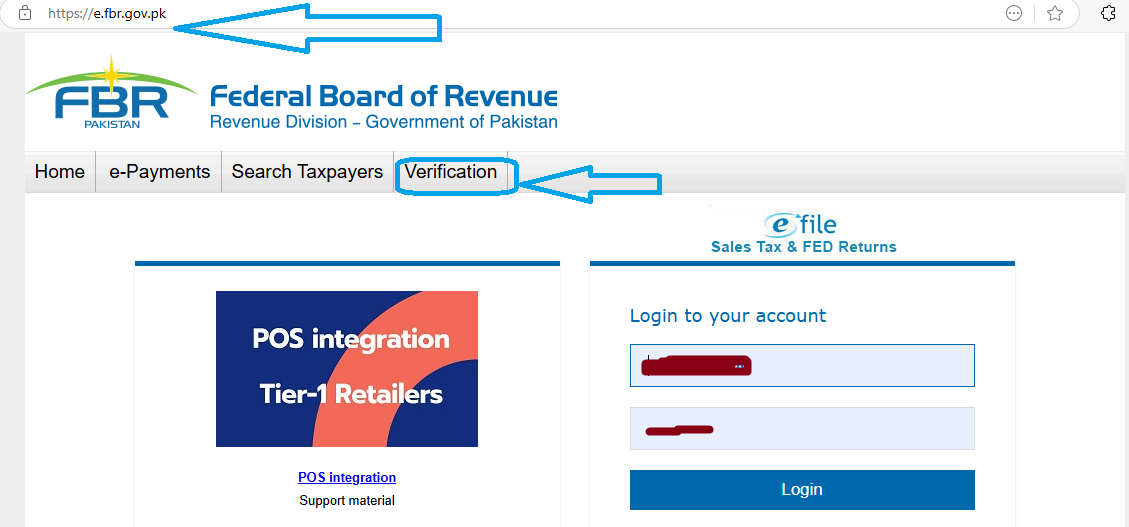
<OPEN TAXPAYER FACILITATION PORTAL
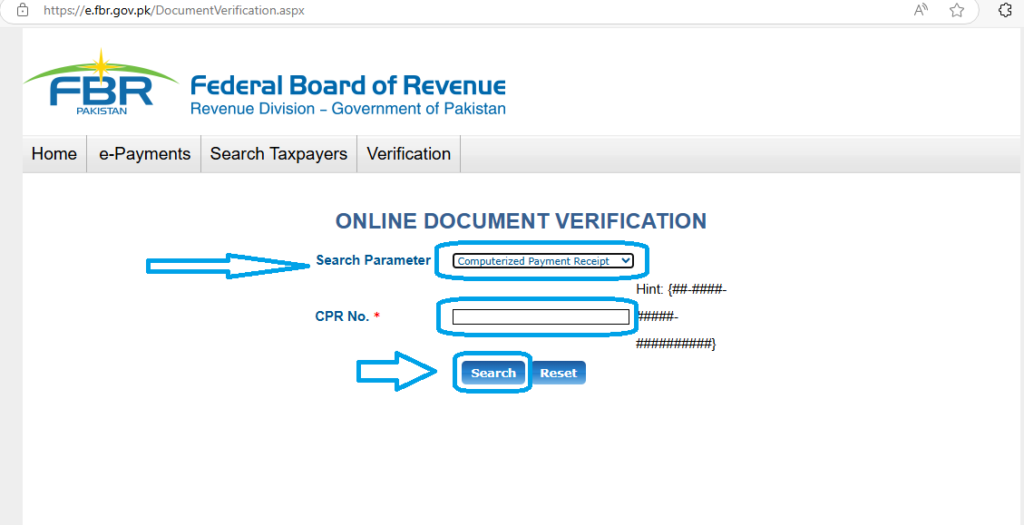
<Go to Verification <Search Parameter
<Inside Search Parameter select Computerized Payment Receipt. <Enter your CPR No. in the format IT-2024-01234-1234567890.<Click on the search button.
<Your CPR will be opened and downloaded in new tab or window of your browser.
is there any alternative way to get CPR as the old procedure to get the CPR is accessible.
email the FBR helpline and they will share the required CPR
Gg
Dear Sir, a locally purchased a 2nd hand device OPPO A54 Model CPH 2239, Serial number C19TGM8LEYTSHEJR alongwith it’s IMEIS Number(862366050654930& 862366050654922) and simcards linked with this device was stopped working/locked up due to non payment of tax-fbr amounting to Rs,11781/-. Tax-fbr amounting to Rs,11781/- was paid through eSaulat ID 61708 through their Receipt No.6170824061412130801 against Consumer Voucher Number 20014185037240613 on 14 June 24. Request CPR, which is required for unlocking of IMEIS.
Tax-fbr amounting to Rs,11781/- was paid through eSaulat ID 61708 vide their Receipt number 6170824061412130801 against Consumer vocher number 20014185037240613 on 24 June 24. Request send receipt. Thanks